



Download Zwift – immersive indoor cycling, virtual training, and social rides
Overview
Zwift has quickly become the benchmark for indoor cycling enthusiasts who want more than a static trainer screen. By blending the excitement of a video‑game world with the rigor of professional‑grade training plans, Zwift turns a routine spin session into a global adventure. Riders can pedal through iconic locations such as Central London, a futuristic New York City skyline, or even the ancient Mayan ruins, all while competing against live athletes from every continent.
The platform supports a wide range of smart trainers, power meters, and basic rollers, translating real‑world effort into a responsive virtual avatar. What truly sets Zwift apart is its social layer: you can join group rides, chat with teammates, and race in real‑time events that mimic real‑world competitions. Each ride is recorded as a .fit file, allowing seamless export to Strava, TrainingPeaks, or MapMyRun for deeper analysis.
Whether you are a seasoned pro chasing PRs or a casual rider looking for a fun way to stay fit, Zwift’s blend of structured workouts, open‑world exploration, and community interaction offers a comprehensive solution for indoor training. The only notable drawbacks are occasional fork decisions that can disrupt timed segments and the need for better visibility on steep climbs during races, but these minor issues hardly detract from the overall experience.
Key Features
- Interactive Worlds: Ride through meticulously rendered environments like London, New York, Watopia, and the newly added London 2022 circuit.
- Live Group Events: Join scheduled group rides, races, and world‑class events with cyclists from around the globe.
- Custom Training Plans: Choose from over 1,000 structured workouts or create your own plan with guidance from elite coaches.
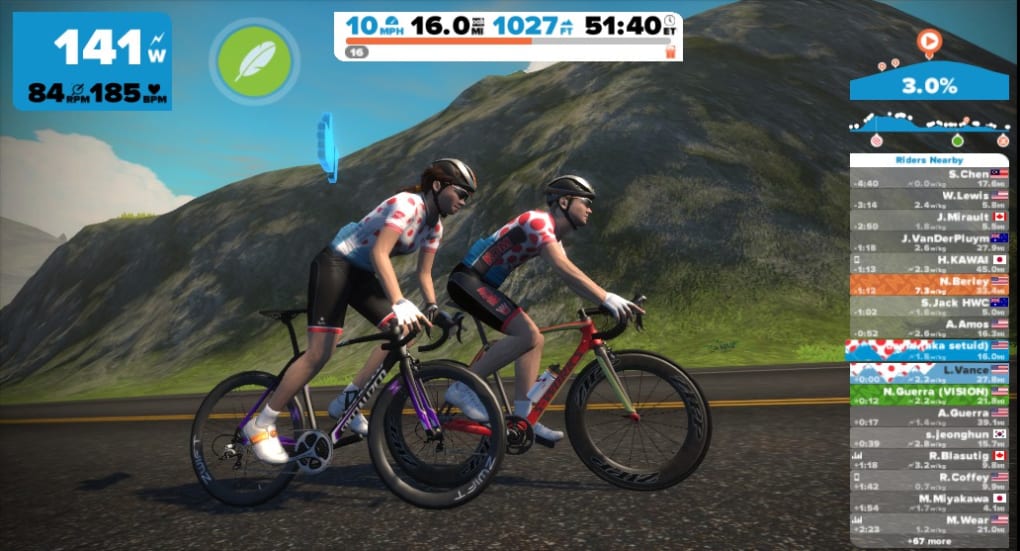
- Real‑Time Performance Metrics: Monitor power, cadence, heart rate, and speed on a dynamic HUD that updates instantly.
- Social Integration: In‑game voice chat, text messaging, and the ability to form private clubs for friends or team members.
- Cross‑Platform Sync: Export ride data as .fit files to Strava, TrainingPeaks, or Garmin Connect for deeper post‑ride analysis.
- Progress Tracking & Leaderboards: Track personal records, compare segment times, and climb the global leaderboards.
- Compatibility with Smart Trainers: Seamlessly pairs with ANT+, Bluetooth, and Zwift‑specific protocols for accurate power measurement.
- Regular Content Updates: New routes, events, and challenges are added monthly, keeping the experience fresh.
- Accessible on Multiple Devices: Available for Windows, macOS, iOS, Android, and Apple TV, allowing flexibility in how you train.
Getting Started: Installation, Usage, Compatibility & Pros/Cons
Installation & First‑Run Setup
Downloading Zwift is straightforward. Visit the official website or your device’s app store, locate “Zwift,” and click “Download.” The installer for Windows or macOS will guide you through a standard installation wizard. Mobile users can simply tap “Install” on iOS or Android.
Once installed, launch the app and create a free account using an email address or connect via Facebook/Google. The onboarding wizard will ask you to pair your smart trainer, power meter, or speed sensor using Bluetooth or ANT+. Follow the on‑screen prompts to calibrate the trainer, set your weight, and select your preferred measurement units.
After the initial calibration, you’ll be greeted by the vibrant world of Watopia, where you can select a quick ride or explore the training plan library.
Operating System Compatibility
Zwift supports the following platforms:
- Windows 10 (64‑bit) or later
- macOS 10.13 High Sierra or later
- iOS 13+ (iPhone, iPad, Apple TV)
- Android 7.0+ (phones, tablets, and Android TV)
- Chromecast Ultra for casting from mobile devices
Pros & Cons
- Pros:
- Highly engaging virtual environments that keep training fun.
- Robust social features encourage community interaction and motivation.
- Extensive library of workouts and custom training plan creation.
- Accurate power and cadence integration with most smart trainers.
- Regularly updated content and events keep the platform fresh.
- Cons:
- Subscription cost may be a barrier for casual riders.
- Fork decisions in races can interrupt timed segments.
- Climbs and time‑trial sections sometimes lack clear visual cues.
- Initial setup can be confusing for users new to smart trainer technology.
- Performance may dip on older computers without dedicated graphics cards.
FAQ & Final Verdict
Do I need a smart trainer to use Zwift?
While a smart trainer provides the most accurate power data and automatic resistance changes, Zwift also works with basic rollers, classic trainers (using a speed sensor), or even a bike with a power meter. The experience is smoother with a smart trainer, but you can still enjoy the virtual world using a basic setup.
Can I ride Zwift on a smartphone?
Yes, Zwift offers native apps for iOS and Android. You can pair your trainer via Bluetooth and ride directly on your phone or tablet, though a larger screen (TV or computer) provides a more immersive experience.
How much does Zwift cost?
Zwift operates on a subscription model: $14.99 USD per month, $99.99 USD per year (equivalent to $8.33 USD per month), or a one‑time purchase of $299 USD for a lifetime license (prices may vary by region).
Is my ride data private?
Zwift adheres to GDPR and CCPA standards. Your ride data is stored securely and can be exported or synced with third‑party platforms at your discretion. You control which data is shared publicly on leaderboards.
What happens if my internet connection drops during a ride?
If the connection is lost, Zwift will pause the ride and display a reconnection screen. Once reconnected, you can resume from the same spot, and any data recorded during the outage is still saved locally.
Conclusion & Call to Action
Zwift delivers a uniquely immersive indoor cycling experience that blends competitive gaming, structured training, and a vibrant community. The platform’s rich visual worlds, extensive workout library, and real‑time social features make it stand out among the growing list of streaming bike apps. While the subscription price and occasional fork‑decision quirks may give some riders pause, the overall value—especially for cyclists seeking motivation and variety—far outweighs the drawbacks. If you’re ready to transform your indoor sessions into epic rides, download Zwift today, pair your trainer, and join a global pack of riders pushing limits together.
Ready to ride? Click here to download Zwift and start your first virtual ride for free.







